

AI Settings
Projenizin Ayarlar > YZ bölümünde, YZ istemlerini yapılandırıp yönetebilir ve otomatik çeviri, Düzenleyicide YZ önerileri ve YZ destekli KG denetimleri gibi özellikler için varsayılan istemleri seçebilirsiniz.
Varsayılan olarak istemler, proje sahibinin hesabının YZ ayarlarından devralınır. Eğer proje sahibinin YZ ayarlarındaki varsayılanlar tüm projelere otomatik olarak uygulanacak şekilde yapılandırılmamışsa otomatik çeviriyi, YZ önerilerini ve YZ destekli KG denetimlerini etkinleştirmek için proje ayarlarındaki istemleri seçin.
Proje ayarlarında yapılandırılan YZ istemleri, proje sahibinin Crowdin hesabındaki YZ istemleri listesine de eklenecektir.
AI Prompt Types:
- Auto-Translation & AI Suggestion
- QA Check
- Custom type
YZ İstemleri proje ayarlarında yapılandırılmadan önce proje sahibinin YZ Sağlayıcılarını yapılandırması da gereklidir.
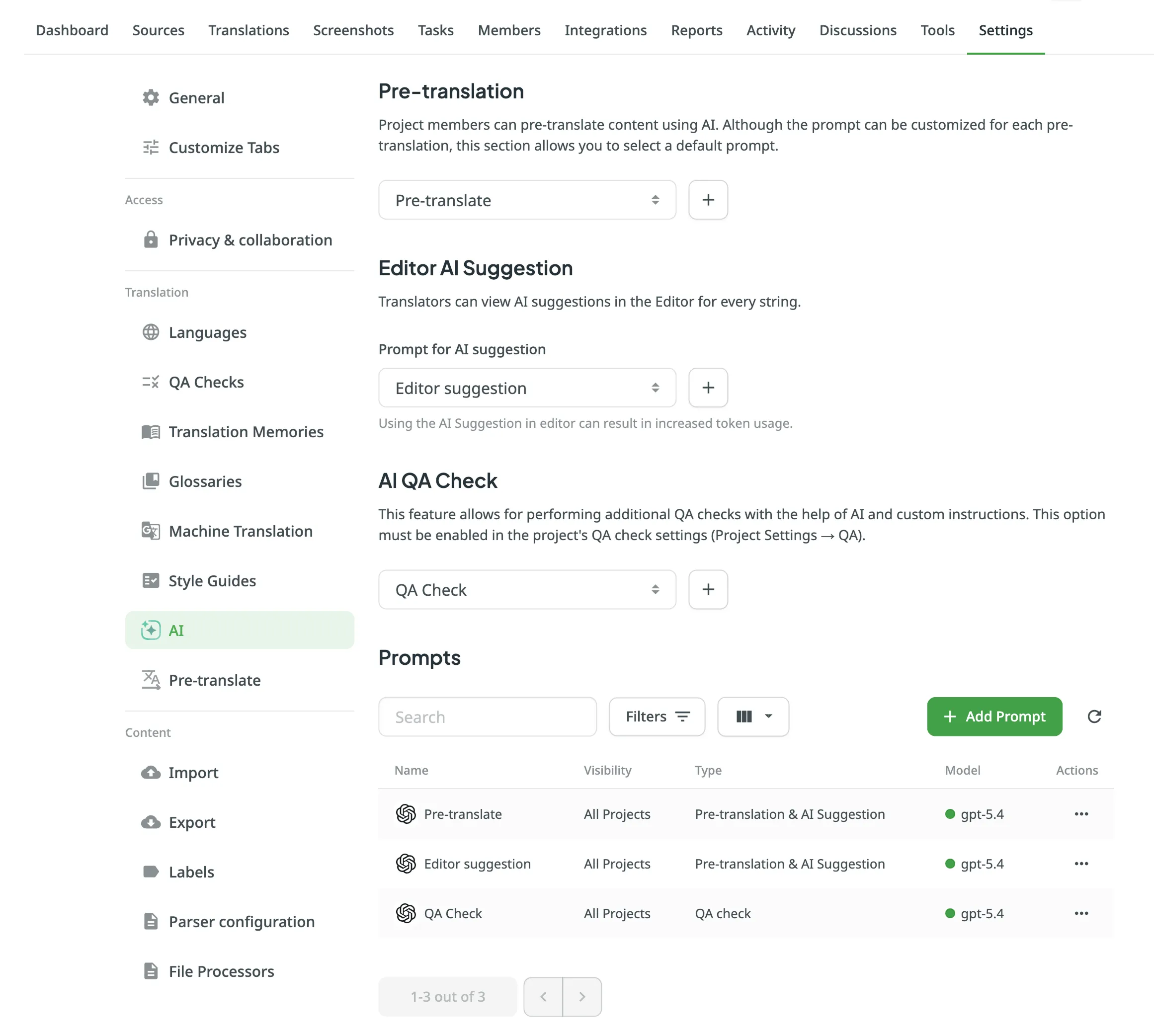
The settings at the top of the page allow you to assign default prompts for key features within this project. Burada seçilen herhangi bir istem, hesabınızdan devralınan varsayılan ayarlara göre öncelikli olacaktır.
- Auto-translation: Select the default Auto-Translation & AI Suggestion prompt that will be automatically selected when running AI auto-translation in this project.
- Editor AI Suggestion: Select the default Auto-Translation & AI Suggestion prompt used for AI suggestions in the Context & Translations section in the Editor.
- AI QA Check: Select the default QA Check prompt used for AI-powered QA checks.
For each option, you can either select an existing prompt from the dropdown menu or click to create a new one.
Below the default prompt settings, the Prompts section lists all AI prompts available to the project. Bu arayüz, hesap ayarlarınızdaki ana istemler listesiyle aynı şekilde çalışır.
From here, you can perform several actions:
- Yeni bir istem oluşturmak için İstem Ekle’ye tıklayın (hesap seviyesindeki listenize eklenecektir).
- Use the Search field and Filters to find specific prompts.
- Kullan (sadece Otomatik Çeviri ve YZ Önerisi istemleri için), Düzenle, Çoğalt veya Sil isteminde simgesine tıklayın.
Crowdin AI hakkında daha fazlasını okuyun.